Home › AI Tools › Google Gemini AI Explained: Features, Models, Pricing, Use Cases, Security, Tutorials & Alternatives (2026 Guide)
AI ToolsGoogle Gemini AI Explained: Features, Models, Pricing, Use Cases, Security, Tutorials & Alternatives (2026 Guide)
By Himanshu Borikar • 2026-07-22 • 11 min read
Last updated: July 2026
What is Google Gemini AI?
Google Gemini AI is Google's flagship conversational AI assistant, built by Google DeepMind. It has quickly become one of the most widely used AI assistants because of its deep integration into products people already use every day - Gmail, Docs, Sheets, Slides, and Android devices.
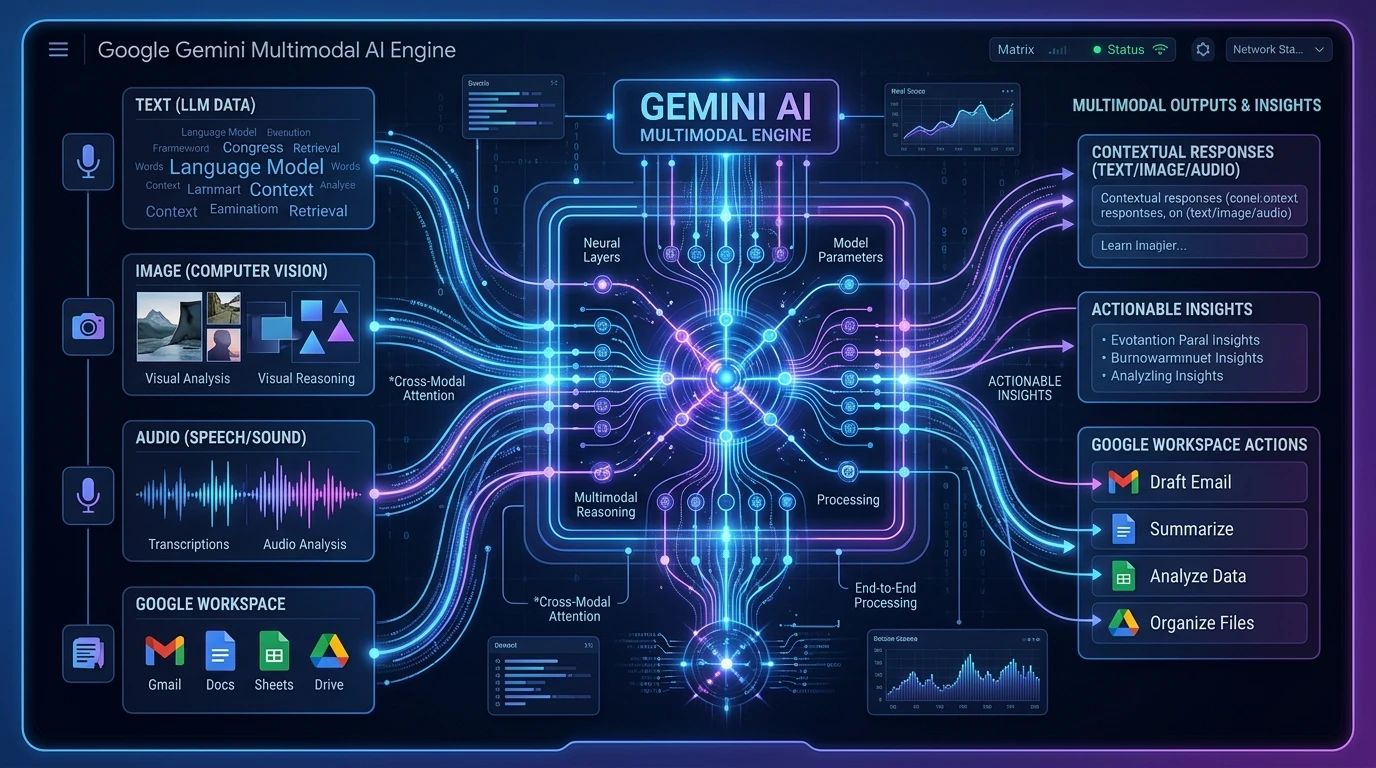
Gemini is powered by a Large Language Model (LLM), a form of Generative AI trained to understand and generate human-like text, images, and more. What makes Google Gemini AI stand out is its multimodal AI design - it was built from the ground up to understand text, images, audio, and documents together, rather than bolting on extra formats later.
Gemini became popular quickly because it removes friction: instead of switching tools, users can ask Gemini to draft an email inside Gmail, summarize a spreadsheet inside Sheets, or research a topic directly inside Search. For students, professionals, developers, and business teams, this tight ecosystem integration makes Gemini AI one of the leading AI assistants for everyday productivity, research, and coding workflows.
Try it directly at the official site: gemini.google.com.
How Gemini AI Works
Gemini processes a request by first accepting whatever input format you provide, then reasoning over it to generate a response.
User Prompt
    |
Text / Image / Audio Input
    |
Gemini Model Processing
    |
Reasoning & Analysis
    |
Response
Unlike text-only assistants, Gemini can accept a photo, a voice note, or a PDF alongside your text prompt, and reason across all of them together - for example, describing an image while also answering a written question about it.
Gemini AI Models Explained
Google offers several Gemini AI models, each tuned for a different balance of speed, cost, and capability.
- Gemini Nano - An on-device model built for lightweight, offline-friendly tasks on phones and small hardware.
- Gemini Flash - A fast, efficient model ideal for everyday chat, summarization, and high-volume tasks.
- Gemini Pro - A stronger reasoning model suited for research, coding, and detailed analysis.
- Gemini Ultra / Flagship - Google's most capable model generation, built for the hardest reasoning, coding, and multimodal tasks.
| Model | Speed | Reasoning | Coding | Multimodal |
|---|---|---|---|---|
| Nano | Very High | Medium | Medium | Limited |
| Flash | Very High | High | High | Yes |
| Pro | High | Very High | High | Yes |
| Ultra / Flagship | High | Very High | Very High | Yes |
[!NOTE] Quick tip
Choose Nano for on-device or offline tasks, Flash for fast daily use, Pro for research and coding depth, and the Ultra/flagship tier when you need the strongest reasoning and multimodal performance available.
Key Gemini AI Features
AI Chat Assistant
Conversational AI for research assistance, brainstorming, and general Q&A.
Google Workspace Integration
As a true Google Workspace AI, Gemini works directly inside:
- Gmail (drafting and summarizing emails)
- Docs (writing and editing assistance)
- Sheets (data analysis and formulas)
- Slides (slide generation)
- Drive (searching and summarizing files)
Multimodal Capabilities
- Image understanding and visual reasoning
- Document analysis across PDFs and reports
- Audio processing for voice-based queries
Coding Assistance
As an AI coding assistant, Gemini supports:
- Code generation and completion
- Debugging and error explanation
- Technical documentation
- API integration support
Real-Time Information Access
Built-in Search integration allows Gemini to pull current, up-to-date information rather than relying solely on training data.
File Upload & Analysis
- PDFs, research papers, and business reports
- Extracting and summarizing key data points
Productivity Features
- Meeting summaries
- Email drafting
- Content generation for marketing and communication
Pricing Overview
As of mid-2026, Google offers several Gemini AI pricing tiers under the "Google AI" subscription umbrella, alongside separate Workspace and Enterprise options.
| Plan | Approx. Price | Best For |
|---|---|---|
| Free | $0/month | Casual users trying Gemini |
| Google AI Plus | ~$7.99/month | Users wanting more than Free without a big upgrade |
| Google AI Pro | ~$19.99/month | Professionals needing higher usage limits, larger context windows, and extra storage |
| Google AI Ultra | ~$99.99/month or ~$199.99/month | Power users and developers needing the highest usage caps and top-tier models |
| Google Workspace (Gemini included) | ~$14/user/month (varies by plan) | Teams and businesses using Gmail, Docs, and Sheets |
| Enterprise Solutions | Custom pricing (contact sales) | Large organizations needing security, compliance, and dedicated support |
Free gives you basic chat access with rate limits, while each paid tier mainly unlocks higher usage caps, larger context windows, more storage, and access to more advanced models. Workspace plans bundle Gemini directly into business email and productivity tools rather than requiring a separate subscription.
[!IMPORTANT] Note
Pricing and plan names change fairly often. Always confirm current rates on the official Google AI subscriptions page before purchasing.
Gemini AI for Developers
As an AI tool for developers, Gemini supports Python, JavaScript, TypeScript, and SQL development, along with strong integration into Google Cloud workflows, Vertex AI, and API development tools.
Example prompt:
"Write a Python function that connects to a Google Cloud Storage bucket, lists all files, and returns their names and sizes as a JSON object."
This kind of prompt reflects how developers commonly pair Gemini with Google Cloud services for real-world backend work.
Gemini AI for Cybersecurity
As an AI tool for cybersecurity, professionals use Gemini for security awareness content, threat research, security documentation, secure coding reviews, incident reporting, and explaining vulnerabilities in plain language.
[!WARNING] Security Disclaimer
Gemini AI should assist cybersecurity professionals but should not replace manual verification, security testing, or expert review.
Security & Privacy Considerations
Google applies its broader security practices to Gemini, but users should still follow good habits:
- Avoid entering confidential credentials or sensitive business data into prompts
- Be aware of prompt injection risks when connecting Gemini to external documents or tools
- Remember that Gemini, like all LLMs, can produce AI hallucinations - confident but incorrect answers
- Always verify important facts, code, or citations before acting on them
- Practice responsible AI usage by reviewing outputs before sharing them externally
Gemini AI Alternatives
Several strong Gemini AI alternatives exist, each with different strengths.
| Tool | Best Use Case |
|---|---|
| ChatGPT | Broad general-purpose use and plugin ecosystem |
| Claude | Long-document analysis and careful reasoning |
| Perplexity | Real-time research with cited sources |
| DeepSeek | Cost-efficient reasoning and coding |
| Grok | Real-time social/X platform context |
Users often prefer Gemini when they're already invested in the Google ecosystem, need strong multimodal input handling, or want tight integration with Gmail, Docs, and Google Cloud.
Pros and Cons
Pros
- Deep, seamless Google Workspace integration
- Strong multimodal capabilities (text, image, audio, documents)
- Real-time Search-backed information retrieval
- Useful productivity features for everyday work
Cons
- Some advanced features are tied to Google's ecosystem
- Free tier usage limits can feel restrictive for heavy users
- Pricing structure has multiple tiers that can be confusing to compare
Frequently Asked Questions
Is Gemini AI free?
Yes. Gemini has a free tier, though usage limits are lower and advanced models are restricted compared to paid plans.
Is Gemini better than ChatGPT?
It depends on your needs - Gemini has an edge for Google Workspace integration and multimodal input, while ChatGPT offers a broader plugin ecosystem.
Can Gemini generate code?
Yes, Gemini functions as a capable AI coding assistant across languages like Python, JavaScript, and SQL, with strong Google Cloud integration.
Can Gemini analyze documents?
Yes, Gemini can read and summarize PDFs, reports, and research papers, including extracting key data points.
Is Gemini useful for cybersecurity professionals?
Yes, as an assistant for research, documentation, and secure coding guidance - but it should not replace formal security testing or expert review.
Conclusion
Google Gemini AI stands out among AI assistants for its multimodal design and deep integration with Google's productivity ecosystem. From lightweight Nano models to the powerful Ultra/flagship tier, Gemini AI Models offer options for nearly every use case - casual chat, coding, research, or enterprise workflows. As Generative AI platforms continue to evolve, Gemini's ecosystem advantage positions it well for the future of everyday AI-powered productivity. If you already rely on Gmail, Docs, or Google Cloud, Gemini AI is well worth exploring at gemini.google.com.
Related Technical Reviews & AI Tools
- 🤖 ChatGPT Explained: Features, Models, Pricing & Alternatives - Complete breakdown of OpenAI ChatGPT, GPT-4o & GPT-5 series.
- 🧡 Claude AI Explained: Features, Models, Pricing & Alternatives - Anthropic Claude AI, 200k+ token context window, and model comparison.
- 🛡️ Zero Trust Architecture Explained - Complete enterprise security roadmap, NIST SP 800-207 model, and ZTNA.
- 🤖 MCP Security Unlocked: Defending Model Context Protocol & AI Agents - Complete engineering guide to Model Context Protocol security and tool execution safety.
- 🔒 OAuth 2.0 Unlocked: The Developer's Field Guide to Secure Authorization - PKCE, OAuth 2.1, security failure modes, and secure React token storage.
- 🛡️ LLM Security in 2026: OWASP Top 10 for AI Applications - Protect production AI systems against prompt injection, data leaks, and insecure output handling.