Home › API Security › OAuth 2.0 Unlocked: The Developer's Field Guide to Secure Authorization (2026 Edition)
API SecurityOAuth 2.0 Unlocked: The Developer's Field Guide to Secure Authorization (2026 Edition)
By Himanshu Borikar • 2026-07-22 • 14 min read
Last updated: July 2026
You've clicked "Sign in with Google" a thousand times without thinking about it. Behind that one click sits a protocol that quietly runs the internet's login system: OAuth 2.0. This guide breaks down exactly what happens in the milliseconds after you click that button, why it exists, where it breaks, and how to implement it without shooting yourself in the foot.
[!NOTE] Analogy
Think of a hotel valet key. It starts the engine and opens the door, but it can't open the glovebox or trunk. If something goes wrong, the hotel deactivates that one key without needing to cut you a brand-new set for the whole car. That's an OAuth access token - scoped, limited, and revocable.
1. Introduction: The Problem Nobody Wants to Admit They Had
Picture this. It's 2007. A budding productivity app wants to let you import your contacts from your email provider. Their solution? They ask for your email password. Directly. You type your actual Gmail password into a random third-party website, and it logs in as you to scrape your contact list.
This actually happened, routinely, in the early web. It was called the "password anti-pattern," and it was a security disaster waiting to happen. Once you hand your password to an app, that app can do anything your account can do - read every email, send messages as you, reset your other accounts through "forgot password" flows. There was no way to say "just read my contacts, nothing else," and no way to revoke access without changing your password everywhere else you'd reused it.
This is the exact problem OAuth 2.0 was built to solve. Instead of handing over your keys, OAuth lets you hand over a valet key - one that starts the car but can't open the trunk, can't go over 60 mph, and can be deactivated at any time without changing your main key.
That's why, today, "Sign in with Google," "Continue with GitHub," "Sign in with Microsoft," and "Add to Discord" all work the same way under the hood. You never type your Google password into the third-party app. You authenticate directly with Google, Google asks if you're okay granting limited access, and only a scoped, revocable token gets handed to the app.
If you build APIs, web apps, or mobile apps in 2026, understanding OAuth 2.0 isn't optional. This guide covers everything from the fundamentals to the security pitfalls that show up in real incident reports, plus what's changing with OAuth 2.1.
2. What Problem Does OAuth 2.0 Actually Solve?
Before OAuth, there were basically two bad options for third-party integrations:
| Approach | Problem |
|---|---|
| Share your password directly | Full account access, no scoping, no easy revocation, huge breach blast radius |
| Build a custom API key per service | No standardized consent, no expiration, users can't see or manage what they've granted |
OAuth 2.0 introduces delegated authorization: a standardized way for a resource owner (you) to grant a client application limited access to a resource server (like Google's API), without ever sharing long-term credentials.
A few concrete, everyday examples:
- A calendar scheduling tool needs to read your Google Calendar - but shouldn't be able to delete your Gmail.
- A CI/CD pipeline needs to push code to your GitHub repo - but shouldn't be able to change your account email.
- A smart TV app needs to link to your Netflix account - but doesn't have a keyboard to type a password, so it uses the Device Authorization flow instead.
In every case, the underlying question OAuth answers is: "How much access, for how long, and how do we know it's really you approving it?"
3. OAuth 2.0 Core Components
Before diving into flows, you need the vocabulary. These seven terms show up in every OAuth conversation, and mixing them up is the #1 cause of confused Stack Overflow questions.
- Resource Owner - The user. The person who owns the data and can grant access to it.
- Client Application - The app requesting access (e.g., the React app, the mobile app, the CI pipeline).
- Authorization Server - Issues tokens after authenticating the user and getting their consent (e.g., Google's, GitHub's, or Auth0's auth server).
- Resource Server - Hosts the protected data or API (e.g., the Google Calendar API).
- Access Token - A short-lived credential the client uses to call the resource server's API.
- Refresh Token - A longer-lived credential used to get a new access token without re-prompting the user.
- Scope - A string that defines exactly what the access token is allowed to do (e.g.,
calendar.readonly,repo:write).
Here's how they relate to each other:
+-------------------+
|  Resource Owner   | (User)
+---------+---------+
          | (Grants Consent)
          v
+---------+---------+
|Client Application |
+---------+---------+
          | (Requests Token)
          v
+---------+---------+
|Authorization Server|
+---------+---------+
          | (Issues Token)
          v
+---------+---------+        (Presents Token)      +-------------------+
|   Access Token    | ---------------------------> |  Resource Server  | (API)
+-------------------+                              +-------------------+
4. How OAuth 2.0 Works: The Authorization Code Flow, Step by Step
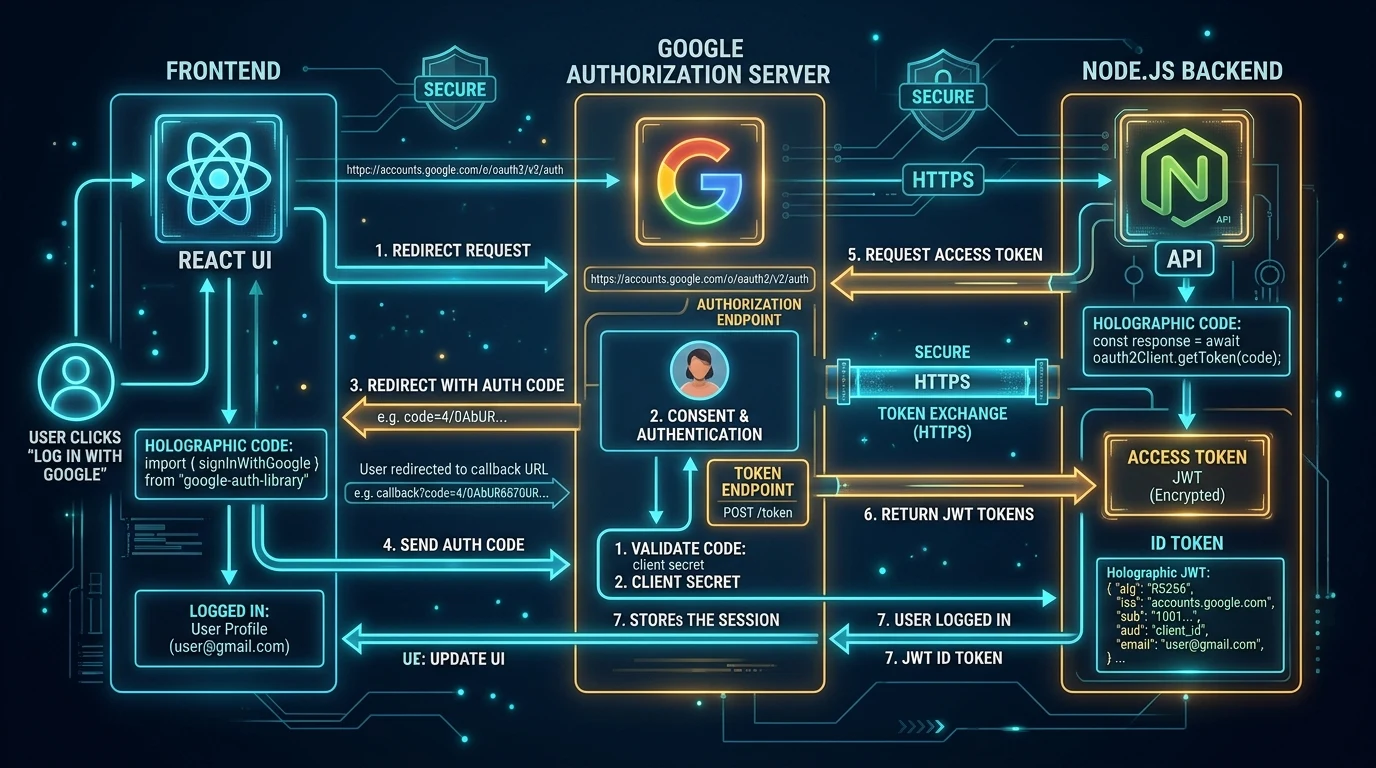
There are several OAuth "grant types" (covered in Section 6), but the Authorization Code Flow is the gold standard for anything with a backend - web apps, mobile apps, and server-side services. Here's the full sequence:
User                  Client App                 Authorization Server          Resource Server (API)
 |                         |                               |                            |
 |-- 1. Clicks "Sign In" ->|                               |                            |
 |                         |-- 2. Redirect to /authorize ->|                            |
 |                         |<-- 3. Shows Login & Consent --|                            |
 |-- 4. Approves Access -->|                               |                            |
 |                         |-- 5. Sends Code to /callback->|                            |
 |                         |-- 6. Exchanges Code /token -->|                            |
 |                         |<-- 7. Issues Tokens ----------|                            |
 |                         |-- 8. Calls API with Bearer Token ------------------------->|
 |                         |<-- 9. Returns Protected Resource Data -------------------|
Step-by-step breakdown:
- Login trigger - The user clicks "Sign in with Google" in your app.
- Authorization request - Your client redirects the browser to the authorization server's
/authorizeendpoint, passing yourclient_id, theredirect_uriyou're allowed to return to, the requestedscope, a randomstatevalue (for CSRF protection), and - critically - a PKCEcode_challenge. - Authentication + consent - The authorization server (Google, in this case) authenticates the user and shows a consent screen: "This app wants to view your calendar. Allow?"
- User approves - The user clicks "Allow."
- Authorization code returned - The browser is redirected back to your
redirect_uriwith a short-lived, single-use authorization code in the query string. - Code exchange - Your backend (never the browser) sends this code, along with the original PKCE
code_verifier, to the authorization server's/tokenendpoint. - Tokens issued - The authorization server verifies everything matches and returns an access token (and often a refresh token).
- API call - Your backend calls the resource server's API, attaching the access token as a Bearer token in the
Authorizationheader. - Protected data returned - The API validates the token and returns the requested data.
The reason the code is exchanged in a separate backend-to-backend step (steps 5-7) rather than handing over the access token directly in the browser redirect is security: URLs get logged in browser history, server logs, and referrer headers. A short-lived, single-use code is far safer to expose there than a long-lived access token.
5. Real Example: Building a React App with Google Login
Let's make this concrete with a realistic architecture: a React frontend, a Node.js backend, and Google as the identity provider.
Frontend (React) - redirect the user to Google:
function LoginWithGoogle() {
  const handleLogin = () => {
    const params = new URLSearchParams({
      client_id: process.env.REACT_APP_GOOGLE_CLIENT_ID,
      redirect_uri: "https://yourapp.com/auth/callback",
      response_type: "code",
      scope: "openid email profile",
      state: crypto.randomUUID(),
      code_challenge: generateCodeChallenge(), // PKCE
      code_challenge_method: "S256",
    });

    window.location.href = `https://accounts.google.com/o/oauth2/v2/auth?${params}`;
  };

  return <button onClick={handleLogin}>Sign in with Google</button>;
}
Backend (Node.js) - exchange the code for tokens:
app.get("/auth/callback", async (req, res) => {
  const { code, state } = req.query;

  // Always verify 'state' matches what you originally sent
  if (state !== req.session.expectedState) {
    return res.status(400).send("Invalid state parameter");
  }

  const tokenResponse = await fetch("https://oauth2.googleapis.com/token", {
    method: "POST",
    headers: { "Content-Type": "application/x-www-form-urlencoded" },
    body: new URLSearchParams({
      code,
      client_id: process.env.GOOGLE_CLIENT_ID,
      client_secret: process.env.GOOGLE_CLIENT_SECRET,
      redirect_uri: "https://yourapp.com/auth/callback",
      grant_type: "authorization_code",
      code_verifier: req.session.codeVerifier,
    }),
  });

  const tokens = await tokenResponse.json();

  // Store tokens server-side (session store / encrypted DB), never in localStorage
  req.session.accessToken = tokens.access_token;
  res.redirect("/dashboard");
});
Token validation on protected routes:
async function requireAuth(req, res, next) {
  const token = req.session.accessToken;
  if (!token) return res.status(401).send("Not authenticated");

  // Validate token with Google's tokeninfo endpoint or verify JWT signature
  const check = await fetch(
    `https://oauth2.googleapis.com/tokeninfo?access_token=${token}`
  );

  if (!check.ok) return res.status(401).send("Invalid or expired token");
  next();
}
Notice what's not happening here: the frontend never sees the client secret, and the access token is stored server-side in a session rather than in localStorage. Both choices matter a lot for security.
6. OAuth 2.0 Grant Types Compared
Not every app fits the Authorization Code Flow. Here's the full landscape:
| Grant Type | Best For | Security Level | Recommended in 2026? |
|---|---|---|---|
| Authorization Code + PKCE | Web apps, mobile apps, SPAs | High | Yes - default choice for all clients |
| Client Credentials | Machine-to-machine, backend services, CI/CD | High (no user involved) | Yes, for server-to-server only |
| Device Authorization Flow | Smart TVs, CLI tools, IoT (no browser/keyboard) | High | Yes, for input-constrained devices |
| Refresh Token Flow | Renewing access without re-login | High, if rotated | Yes, with rotation enabled |
| Implicit Flow | Legacy SPAs (pre-PKCE era) | Low - tokens exposed in URL fragment | Deprecated, avoid entirely |
| Resource Owner Password Credentials | Legacy first-party migrations only | Low - reintroduces password sharing | Deprecated, avoid entirely |
The short version: use Authorization Code + PKCE for anything a human logs into, and Client Credentials for anything machine-to-machine. The Implicit and Password grants exist mostly as cautionary tales at this point - both are formally removed in OAuth 2.1.
7. OAuth 2.0 vs. OpenID Connect (OIDC)
This is the single most common point of confusion for developers new to the space, so let's be precise.
OAuth 2.0 is an authorization framework. It answers: "Is this app allowed to access this resource?" It was never designed to tell an application who the user is - only what they're allowed to do.
OpenID Connect (OIDC) is an identity layer built on top of OAuth 2.0. It adds a standardized way to answer: "Who is this user, and can I trust that they authenticated?"
| Dimension | OAuth 2.0 | OpenID Connect |
|---|---|---|
| Primary purpose | Authorization (access) | Authentication (identity) |
| Core question answered | "What can this app do?" | "Who is this user?" |
| Token issued | Access Token | Access Token + ID Token (JWT) |
| Token format | Often opaque | ID Token is always a signed JWT |
| Contains user identity? | Not by design | Yes - sub, email, name, etc. |
| Typical scope | read, write, calendar.readonly | openid, profile, email |
Real-world example: When you click "Sign in with Google" and the app shows your name and profile photo, that's OIDC's ID Token at work. When that same app later reads your Google Calendar on your behalf, that's plain OAuth 2.0's access token doing the job. Most modern "social login" buttons use both simultaneously - OIDC for "who are you," OAuth for "what can this app touch."
8. OAuth 2.0 Security Risks (And How to Actually Mitigate Them)
OAuth is secure by design, but it is not secure by default. Nearly every real-world OAuth breach traces back to one of these seven failure modes.
               +-----------------------------+
               |     OAuth Implementation    |
               +--------------+--------------+
                              |
                     +--------v--------+
                     | Common Failures |
                     +--------+--------+
                              |
  +------------+--------------+--------------+------------+
  |            |              |              |            |
+-v--------+ +-v----------+ +-v----------+ +-v--------+ +-v--------+
|  Token   | | Auth Code  | | Open       | | Refresh  | | Phishing |
|  Theft   | | Intercept  | | Redirect   | | Abuse    | | Attacks  |
+----------+ +------------+ +------------+ +----------+ +----------+
Token Theft
Description: An attacker obtains a valid access or refresh token, typically via XSS, malicious browser extensions, or insecure storage.
Real-world scenario: A SPA stores its access token in localStorage. A single XSS vulnerability in a third-party ad script reads localStorage and exfiltrates the token to an attacker's server.
Impact: Full account access for as long as the token remains valid.
Mitigation: Store tokens in HttpOnly, Secure cookies rather than localStorage or sessionStorage; apply a strict Content Security Policy; keep access token lifetimes short.
Authorization Code Interception
Description: An attacker intercepts the authorization code during the redirect step, before it's exchanged for tokens.
Real-world scenario: A mobile app registers a custom URL scheme (myapp://callback) that a malicious app on the same device also registers, hijacking the redirect and capturing the code.
Impact: Attacker exchanges the stolen code for tokens themselves.
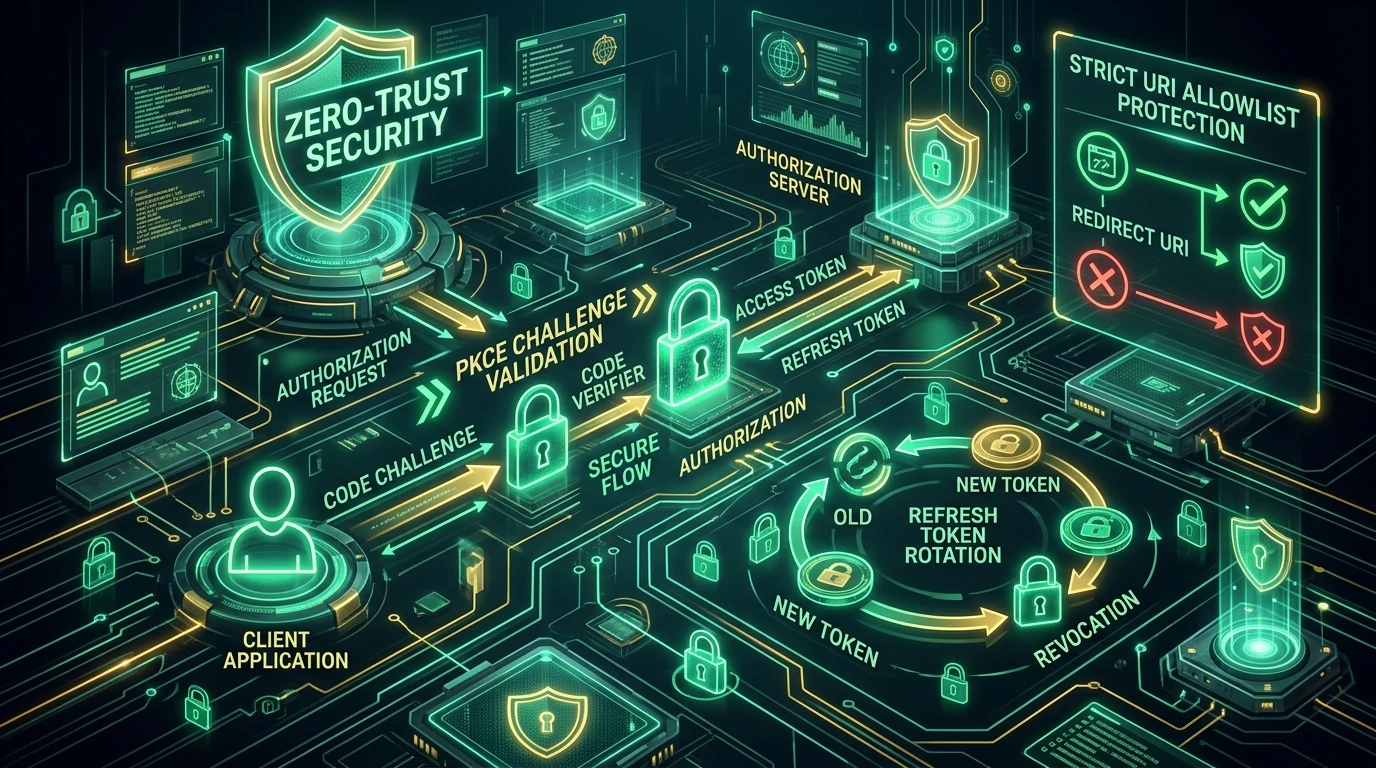
Mitigation: PKCE. Even if the code is intercepted, the attacker can't complete the exchange without the original code_verifier, which never leaves the legitimate client.
Open Redirect Vulnerabilities
Description: The authorization server or client fails to strictly validate redirect_uri, allowing tokens/codes to be sent to attacker-controlled domains.
Real-world scenario: A poorly validated redirect_uri accepts wildcard subdomains, so evil.legituserdomain.com passes validation and receives the authorization code.
Impact: Full credential/token compromise via a single crafted link sent in a phishing email.
Mitigation: Enforce exact-match redirect_uri validation with no wildcards; maintain an allowlist registered per client.
Refresh Token Abuse
Description: A stolen, long-lived refresh token is reused repeatedly to mint fresh access tokens indefinitely.
Impact: Persistent, long-term unauthorized access that survives access token expiration.
Mitigation: Implement refresh token rotation - each use invalidates the old token and issues a new one - and detect reuse of an already-rotated token as a signal of compromise (this is called "refresh token reuse detection").
Phishing Attacks
Description: Attackers create a fake consent screen or fake login page that mimics the real authorization server.
Real-world scenario: "Consent phishing" - a malicious OAuth app with a legitimate-looking name and logo requests broad scopes (e.g., full mailbox access) via a real Microsoft or Google consent screen, tricking users into approving it.
Impact: Attacker-owned app gets a legitimate, long-lived OAuth grant without ever needing the user's password.
Mitigation: User education on reviewing requested scopes before approving; admin-level app allowlisting in enterprise environments; anomaly monitoring on newly registered OAuth apps.
Scope Misconfiguration
Description: Client applications request - and authorization servers grant - broader scopes than actually needed.
Impact: A single compromised token grants far more access than the application actually uses, expanding the blast radius of any breach.
Mitigation: Apply the principle of least privilege; request the narrowest scope that satisfies the feature; regularly audit granted scopes against actual API usage.
Token Leakage
Description: Tokens end up somewhere they shouldn't - server logs, browser history, Referer headers, or error-tracking tools.
Real-world scenario: An access token passed as a URL query parameter gets logged by a CDN's access logs and later exposed in a log-aggregation tool with broad internal access.
Impact: Delayed-discovery compromise, often found only during a security audit.
Mitigation: Always pass tokens in the Authorization header, never in the URL; scrub tokens from logs; set short expiration windows.
9. OAuth 2.1: What's Actually Changing
OAuth 2.1 isn't a new protocol from scratch - it's a consolidation effort that folds a decade of security best practices, previously scattered across various RFCs and BCPs, into a single, cleaner specification.
Why it exists: By the mid-2020s, the "correct" way to implement OAuth 2.0 securely required reading OAuth 2.0 itself plus half a dozen supplementary documents (PKCE, the security BCP, JWT profile, etc.). OAuth 2.1 bakes those hard-won lessons directly into the core spec so there's one authoritative source of truth.
Key changes:
| Aspect | OAuth 2.0 | OAuth 2.1 |
|---|---|---|
| PKCE | Optional (recommended) | Mandatory for all clients using Authorization Code flow |
| Implicit Grant | Allowed | Removed entirely |
| Password Grant | Allowed | Removed entirely |
| Redirect URI matching | Could allow partial/wildcard matching | Exact string matching required |
| Refresh tokens for public clients | No rotation requirement | Rotation required, or sender-constrained |
| Bearer tokens in query string | Permitted in some flows | Prohibited |
Migration considerations: If you're already following current security best practices (PKCE everywhere, no Implicit flow, exact redirect matching, refresh rotation), you're effectively OAuth 2.1-compliant already. Most of the migration work is really about auditing legacy integrations that still lean on the deprecated grants and modernizing them before they're switched off entirely.
10. Common OAuth Mistakes Developers Make
| Mistake | Why It's Dangerous | The Fix |
|---|---|---|
Storing tokens in localStorage | Fully readable by any injected JavaScript (XSS) | Use HttpOnly, Secure cookies or in-memory storage for SPAs |
| Skipping PKCE | Authorization code becomes interceptable | Always implement PKCE, even for confidential clients |
| Requesting overly broad scopes | Expands the impact of any single token compromise | Request the minimum scope the feature actually needs |
| Long-lived access tokens | Extends the window of exposure if leaked | Keep access tokens short-lived (minutes to a couple hours); use refresh tokens for longevity |
| Loose redirect URI validation | Enables open-redirect and code-theft attacks | Enforce exact-match allowlisted redirect URIs |
| Skipping HTTPS anywhere in the flow | Tokens and codes travel in plaintext, interceptable on the network | Enforce HTTPS/TLS on every endpoint, no exceptions |
11. OAuth 2.0 Security Best Practices Checklist
Use this as a pre-launch audit for any OAuth integration:
- Use the Authorization Code flow - never Implicit, never Password grant
- Implement PKCE on every client, public or confidential
- Enforce HTTPS across every redirect and API call, no exceptions
- Validate redirect URIs with exact-match allowlisting
- Rotate refresh tokens on every use, with reuse detection
- Apply least-privilege scopes - request only what's needed
- Monitor token usage for anomalies (impossible travel, sudden scope escalation)
- Store tokens securely - HttpOnly cookies or server-side sessions, never
localStorage - Layer on MFA at the authorization server for sensitive accounts
12. OAuth 2.0 in Popular Platforms
- Google - Full Authorization Code + PKCE support, layered with OpenID Connect for identity. Powers "Sign in with Google" and Google Workspace API access.
- GitHub - Uses OAuth Apps and the more granular GitHub Apps model, with fine-grained, repository-scoped permissions rather than broad account-wide scopes.
- Microsoft - Microsoft Identity Platform implements OAuth 2.0 and OIDC together, powering both consumer Microsoft accounts and enterprise Azure AD (Entra ID) sign-ins.
- Slack - Uses OAuth 2.0 scopes tied tightly to specific bot and user capabilities (e.g.,
chat:write,channels:read) for its app marketplace. - Discord - Implements standard Authorization Code flow for bot and app integrations, with scopes like
identify,guilds, andbot.
13. OAuth vs. JWT vs. SAML
Another frequent mix-up. These three solve different, overlapping problems:
| Dimension | OAuth 2.0 | JWT | SAML |
|---|---|---|---|
| Purpose | Authorization framework/protocol | Token format (not a protocol) | Authentication/authorization protocol (mostly enterprise SSO) |
| What it is | A set of flows for delegated access | A compact, signed, self-contained data structure | An XML-based standard, older than OAuth |
| Complexity | Moderate | Low (it's just a data format) | High - verbose XML, complex config |
| Typical use case | Consumer apps, mobile, APIs | Access tokens, ID tokens (often used inside OAuth/OIDC) | Enterprise SSO (e.g., logging into Salesforce via corporate identity provider) |
| Security model | Token-based, scoped, revocable | Depends entirely on signature validation | Assertion-based, signed XML documents |
The key nuance: JWT isn't a competitor to OAuth - it's often a building block inside it. Access tokens and ID tokens are frequently formatted as JWTs. SAML, meanwhile, predates OAuth and still dominates traditional enterprise SSO, though OIDC has been steadily replacing it in newer implementations because JSON is simpler to work with than XML.
14. OAuth 2.0 Interview Questions
- What problem does OAuth 2.0 solve? - Delegated, scoped access without sharing passwords.
- What's the difference between authentication and authorization? - Authentication confirms identity; authorization determines permissions. OAuth handles the latter; OIDC adds the former.
- Walk through the Authorization Code flow. - See Section 4.
- What is PKCE and why does it matter? - A code-challenge/verifier mechanism that prevents authorization code interception attacks, especially critical for public clients like SPAs and mobile apps.
- Why is the Implicit flow deprecated? - Because it returns tokens directly in the URL fragment, exposing them to browser history, referrer leaks, and network logs.
- What's the difference between an access token and a refresh token? - Access tokens are short-lived and used to call APIs; refresh tokens are longer-lived and used only to obtain new access tokens.
- What is scope in OAuth? - A parameter defining exactly what access a token grants (e.g.,
read:messages). - How does OpenID Connect extend OAuth 2.0? - By adding a standardized ID Token (JWT) that communicates verified user identity.
- What is the state parameter for? - CSRF protection during the authorization redirect.
- What is the Client Credentials grant used for? - Machine-to-machine authentication with no end user involved.
- What is the Device Authorization Grant? - A flow for input-constrained devices (smart TVs, CLI tools) that displays a code for the user to enter on a separate device.
- Why shouldn't access tokens be stored in localStorage? - They become readable by any script running on the page, making them vulnerable to XSS-based theft.
- What is refresh token rotation? - Issuing a new refresh token on every use and invalidating the old one, limiting the value of a stolen refresh token.
- What's the difference between a confidential client and a public client? - Confidential clients (backend servers) can securely store a client secret; public clients (SPAs, mobile apps) cannot, which is why PKCE is required for them.
- What are the main changes in OAuth 2.1? - Mandatory PKCE, removal of Implicit and Password grants, exact redirect URI matching, and mandatory refresh token protections.
- How would you prevent an open redirect vulnerability? - Enforce exact-match, pre-registered redirect URIs with no wildcard support.
- What's the difference between OAuth and SAML? - OAuth is JSON/REST-based and built for modern web/mobile/API use cases; SAML is XML-based and dominant in legacy enterprise SSO.
- Why are access tokens typically short-lived? - To minimize the window of exposure if a token is ever leaked or stolen.
- What is consent phishing? - Tricking a user into approving a malicious OAuth app's legitimate-looking consent request to gain broad account access without stealing a password.
- How do you implement least privilege in OAuth? - Request the narrowest set of scopes necessary for the feature, and regularly audit granted scopes against real usage.
15. Frequently Asked Questions
Is OAuth authentication or authorization?
OAuth 2.0 is fundamentally an authorization protocol - it governs access to resources. Authentication (verifying who the user is) is handled by OpenID Connect, which is built on top of OAuth.
Is OAuth 2.0 secure?
Yes, when implemented correctly - with PKCE, HTTPS, exact redirect URI validation, and short-lived tokens. Most real-world OAuth breaches result from implementation mistakes, not flaws in the protocol itself.
What is PKCE?
Proof Key for Code Exchange - a security extension that ties the authorization code request to a specific client using a dynamically generated secret (code_verifier / code_challenge pair), preventing intercepted codes from being exchanged by attackers.
What is a refresh token?
A long-lived credential used to obtain new access tokens without forcing the user to log in again. It should be stored securely and rotated on each use.
What is OAuth 2.1?
A consolidation of OAuth 2.0 plus a decade of security best practices into a single, stricter specification - making PKCE mandatory and removing the Implicit and Password grants.
What is the difference between OAuth and JWT?
OAuth is a protocol/framework for delegated authorization. JWT is a token format - a way of structuring signed data - that OAuth implementations often use for access and ID tokens.
What is a scope in OAuth 2.0?
A string parameter that limits exactly what an access token can do, such as read:calendar or write:contacts.
What's the difference between OAuth 2.0 and OpenID Connect?
OAuth handles authorization ("what can this app access"); OIDC adds an identity layer ("who is this user") via a signed ID Token.
Why was the Implicit flow deprecated?
Because it returns access tokens directly in the browser's URL fragment, exposing them to logs, browser history, and referrer leakage - all avoidable with the Authorization Code + PKCE flow instead.
What's the difference between an authorization server and a resource server?
The authorization server authenticates users and issues tokens (e.g., Google's login system). The resource server hosts the protected API and validates tokens on incoming requests (e.g., the Google Calendar API itself).
Can OAuth tokens be revoked?
Yes - most authorization servers provide a revocation endpoint, and users can typically revoke third-party app access directly from their account security settings.
Should I build my own OAuth server?
For most teams, no - use a proven identity provider (Auth0, Okta, AWS Cognito, Keycloak, or a cloud provider's built-in identity platform) rather than hand-rolling token issuance and validation logic.
What's the safest place to store an access token in a browser?
An HttpOnly, Secure, SameSite cookie set by your backend - never localStorage or sessionStorage, which are readable by JavaScript and therefore vulnerable to XSS.
Does OAuth work for mobile apps?
Yes - the Authorization Code flow with PKCE is the recommended approach for native mobile apps, using the system browser (not an embedded webview) for the authorization step.
What happens if a refresh token is stolen?
With rotation enabled, using a stolen refresh token invalidates the legitimate session's chain and can trigger reuse-detection alerts; without rotation, the thief could mint new access tokens indefinitely until the refresh token expires or is manually revoked.
16. Conclusion: Key Takeaways
OAuth 2.0 isn't complicated once you separate the concepts from the implementation details. The core idea is simple: delegated, scoped, revocable access instead of password sharing. The complexity lives in getting the implementation details right - PKCE, redirect validation, token storage, and scope discipline.
Actionable next steps:
- Audit your current OAuth integrations against the Section 11 checklist today.
- If you're still running the Implicit or Password grant anywhere, plan migration to Authorization Code + PKCE now, ahead of OAuth 2.1 enforcement.
- Move any tokens currently sitting in
localStorageinto HttpOnly cookies or server-side sessions. - Add refresh token rotation with reuse detection if you haven't already.
- Review the scopes your app requests - trim anything you don't actively use.
Get these fundamentals right, and OAuth 2.0 does exactly what it was designed to do: let your users say yes to the right access, and no to everything else.