Home › Cybersecurity Tools › Nmap: Complete Guide to Features, Installation, Use Cases & Best Practices
Cybersecurity ToolsNmap: Complete Guide to Features, Installation, Use Cases & Best Practices
By Himanshu Borikar • 2026-07-23 • 15 min read
Last updated: July 2026
Quick Summary: Nmap (Network Mapper) is the industry-standard free and open-source network discovery and security auditing tool. It sends crafted packets to target hosts to discover live devices, open TCP/UDP ports, listening services, operating systems, and security vulnerabilities across modern networks.
Introduction
If you've spent any time around network security, you've heard of Nmap. Short for "Network Mapper," it's the tool most professionals reach for first when they need to understand what's actually running on a network - not what documentation says should be there, but what's really there.
Nmap sends crafted packets to target hosts and reads the responses to figure out which hosts are alive, which ports are open, what services are listening, and often what operating system is underneath it all. It's been around since 1997, and nearly three decades later it's still a staple in almost every security professional's toolkit.
SOC analysts use it for asset visibility. Penetration testers use it during reconnaissance. Network administrators use it to catch rogue devices. Bug bounty hunters use it to map attack surface before digging deeper. And if you're just starting out in cybersecurity, Nmap is usually one of the first tools you'll learn - because understanding how it works teaches you how networks actually behave, not just how they're supposed to behave on paper. That foundational knowledge connects directly to concepts like the OSI model and the difference between TCP and UDP, which is why Nmap tends to show up early in almost every security curriculum.
This guide walks through what Nmap is, how to install it, how to use it responsibly, and where it fits alongside other tools in a modern security workflow.
Quick Overview Table
| Attribute | Details |
|---|---|
| Tool Name | Nmap (Network Mapper) |
| Developer | Gordon Lyon ("Fyodor") and the Nmap Project |
| License | Nmap Public Source License (NPSL) |
| Category | Network scanning / security auditing |
| Latest Stable Version | 7.99 (released March 26, 2026) |
| First Release | September 1997 |
| Operating Systems | Windows, Linux, macOS, BSD, Solaris |
| Interface | Command-line (CLI), with optional Zenmap GUI |
| Official Website | nmap.org |
| Documentation | nmap.org/book |
| GitHub Repository | github.com/nmap/nmap |
| Pricing | Free and open source |
| Free Version Availability | Yes - full feature set |
| Best For | Network discovery, port scanning, service/OS detection, security auditing |
What is Nmap?
Nmap is a free, open-source network scanning tool used to discover hosts and services on a network by sending packets and analyzing the responses.
Gordon Lyon, better known by his handle Fyodor, created Nmap and published it in Phrack magazine in 1997 as a simple port scanner. It has since grown into a full network discovery and auditing suite, maintained by a global open-source community and licensed under the Nmap Public Source License (NPSL), a custom license the project adopted with version 7.90.
Nmap is used across nearly every industry that touches networked systems - finance, healthcare, government, telecom, and tech. Security teams use it to build accurate asset inventories, auditors use it to verify compliance boundaries, and incident responders use it to understand what an attacker could see during a breach.
How Nmap Works
A typical workflow looks like this: define a target range, run a discovery scan to see what's alive, follow up with a port scan to see what's open, then layer on service and OS detection to understand what's actually running. From there, the Nmap Scripting Engine can dig deeper into specific services.
Target Definition / Scope
    |
Host Discovery (ICMP/ARP Probes)
    |
Port Scanning (SYN/Connect/UDP)
    |
Service & OS Detection (-sV -O)
    |
NSE Script Execution (--script)
    |
Audit Report & XML Export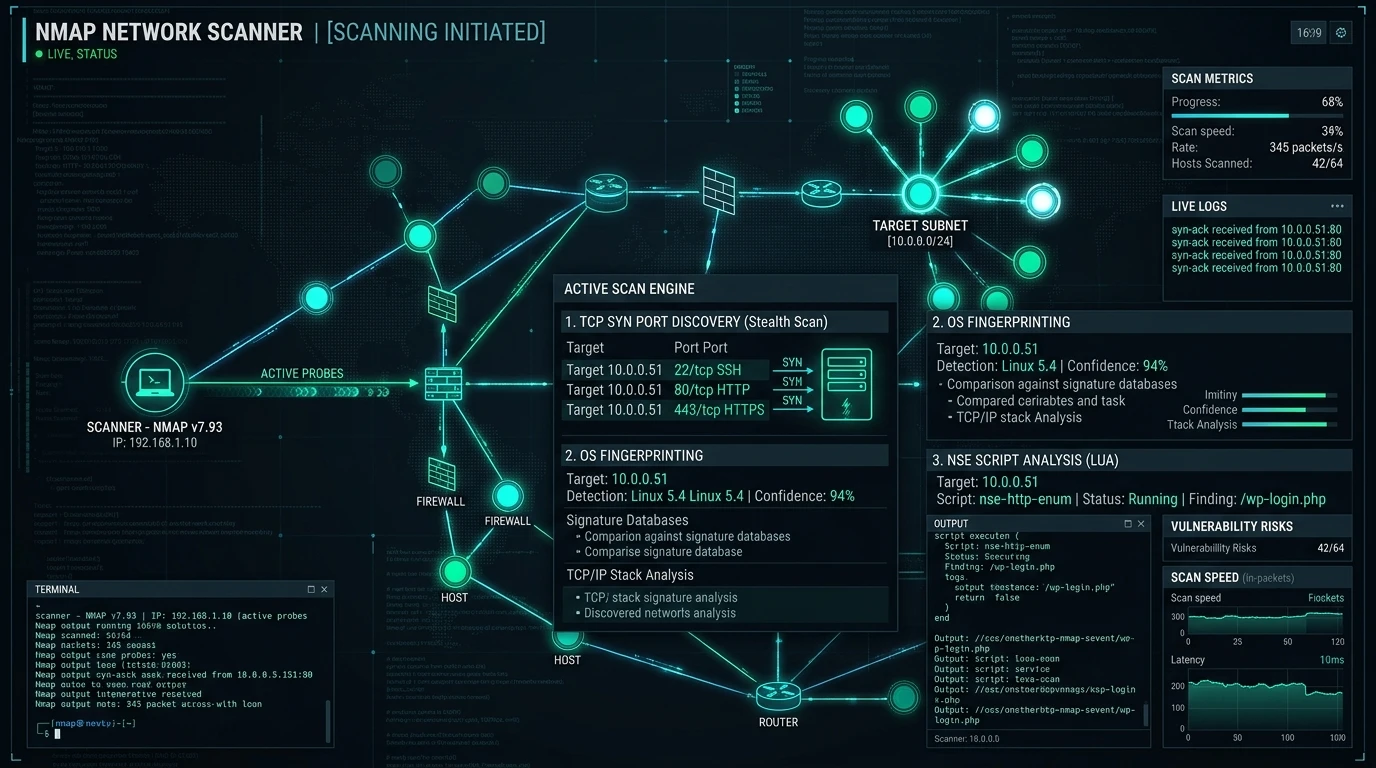
Key Features
| Feature | What It Does |
|---|---|
| Network Discovery | Identifies live hosts on a network segment |
| Port Scanning | Determines which TCP/UDP ports are open, closed, or filtered |
| OS Detection | Fingerprints the likely operating system of a target |
| Service Version Detection | Identifies software and version running on open ports |
| Nmap Scripting Engine (NSE) | Runs Lua scripts for deeper enumeration and checks |
| IPv6 Support | Scans modern IPv6 networks, not just IPv4 |
| Host Discovery | Uses ICMP, ARP, and TCP/UDP probes to find live systems |
| Firewall/IDS Detection | Identifies filtering devices and evasion opportunities |
| XML Export | Outputs results in XML for integration with other tools |
| Automation | Scriptable for scheduled or large-scale scanning |
| Performance | Timing templates balance speed against stealth and accuracy |
| Cross-platform Support | Runs natively on Windows, Linux, and macOS |
A few of these deserve extra attention. Port scanning is the core function - Nmap supports multiple scan types (SYN, connect, UDP, and more), each with different trade-offs around speed, privilege requirements, and detectability. The Nmap Scripting Engine (NSE) is what turns Nmap from a scanner into a platform: hundreds of community-written scripts can check for outdated software, misconfigurations, or default credentials, extending Nmap's reach well beyond basic port enumeration.
Download & Installation Guide
Always download Nmap from the official Nmap website or the official GitHub repository. Avoid third-party download sites, since Nmap installers are frequently repackaged with unwanted bundled software.
| Platform | Installation Method |
|---|---|
| Windows | Download the self-installer (nmap-7.99-setup.exe) from nmap.org, which bundles the Npcap driver and optional Zenmap GUI |
| Kali Linux | Pre-installed; update with sudo apt update && sudo apt install nmap |
| Ubuntu | sudo apt update && sudo apt install nmap |
| Debian | sudo apt update && sudo apt install nmap |
| Fedora | sudo dnf install nmap |
| Arch Linux | sudo pacman -S nmap |
| macOS (Homebrew) | brew install nmap |
| Docker | docker pull instrumentisto/nmap (community-maintained image; verify source before use) |
Verifying installation: After installing, run nmap --version in your terminal. You should see the installed version number along with compiled-in libraries like OpenSSL and libpcap.
Common installation issues:
- Windows raw packet scans failing - usually means Npcap wasn't installed correctly; reinstall it separately from
npcap.com. - Permission denied on Linux/macOS - many scan types (like SYN scans) require root privileges; use
sudo. - Command not found - confirm the install completed and that Nmap's binary is in your system PATH.
Basic Usage
The examples below assume you're scanning systems you own or have explicit written permission to test - a lab environment, your own home network, or an authorized client engagement.
| Task | Example Command |
|---|---|
| Basic scan of a single host | nmap 192.168.1.10 |
| Scan a hostname | nmap example.local |
| Scan multiple hosts | nmap 192.168.1.10 192.168.1.11 |
| Scan a subnet (CIDR) | nmap 192.168.1.0/24 |
| Scan specific ports | nmap -p 22,80,443 192.168.1.10 |
| Scan all 65535 ports | nmap -p- 192.168.1.10 |
| Service version detection | nmap -sV 192.168.1.10 |
| OS detection | nmap -O 192.168.1.10 |
| Save output to a file | nmap -oN results.txt 192.168.1.10 |
| Save output as XML | nmap -oX results.xml 192.168.1.10 |
Output is organized by host, listing each scanned port along with its state (open, closed, or filtered) and, when detection flags are used, the service and version identified. Reading this output carefully - rather than just skimming for "open" ports - is a skill in itself, and it's where a solid grasp of common network ports and their typical services pays off.
Real-World Use Cases
- SOC Operations - maintaining visibility into live hosts and unexpected open ports
- Penetration Testing - reconnaissance and attack surface mapping during authorized engagements
- Asset Discovery - building accurate, current inventories of networked devices
- Network Auditing - verifying segmentation and firewall rules are working as intended
- Incident Response - understanding what an attacker could have seen or reached
- Compliance - supporting audits that require documented network visibility
- Security Assessments - baseline scanning before deeper vulnerability assessment work
- Cloud Infrastructure - validating exposed services on cloud-hosted assets
- Lab Environments - safe, controlled practice for students and certification candidates
- Education - teaching foundational networking and security concepts
Advantages
- Free and open source, with no licensing cost for standard use
- Extremely well documented, with an active community and long track record
- Highly flexible - from a quick single-host scan to scripted enterprise-wide sweeps
- Cross-platform, running natively on all major operating systems
- Extensible through NSE scripts for specialized checks
- Trusted and widely adopted, making it easy to find community support
Limitations
- Not a full vulnerability scanner - NSE's vuln scripts check specific known issues, but Nmap isn't a substitute for dedicated tools like Nessus or OpenVAS
- Large scans across big address spaces can be slow compared to specialized fast scanners
- Results can be affected by firewalls, rate limiting, and intrusion prevention systems
- Requires some networking knowledge to interpret results accurately
- Aggressive scan settings can trigger security alerts or, in some configurations, affect fragile network devices
Best Practices
- Keep Nmap updated - new releases include updated OS and service fingerprints that improve accuracy
- Scan only with authorization - written permission isn't optional; unauthorized scanning can have legal consequences
- Document scope and timing - record what was scanned, when, and under what authorization
- Combine with other tools - pair Nmap's discovery with dedicated vulnerability scanners and a broader vulnerability assessment process
- Scan responsibly - use timing templates and scan types appropriate to the environment to avoid disruption
- Report clearly - translate raw scan output into findings stakeholders can actually act on
Pricing
Is Nmap free? Yes. Nmap is free and open source under the Nmap Public Source License (NPSL). There is no paid tier, subscription, or license fee required for standard use, including commercial security work.
Zenmap, the official graphical front-end for Nmap, is also free and bundled with several installers. Support is community-driven through the official mailing lists, documentation, and GitHub repository rather than a paid support contract.
[!NOTE] Note
Pricing and licensing information is accurate at the time of writing. Refer to the official Nmap website for the latest details.
Nmap vs Alternatives
| Tool | Strengths | Best For |
|---|---|---|
| Nmap | Deep feature set, OS/service detection, NSE scripting, mature documentation | General-purpose network discovery and auditing |
| Masscan | Extremely fast, asynchronous scanning across huge address spaces | Rapid internet-scale port scanning |
| RustScan | Very fast port discovery, often paired with Nmap for deeper scans | Quick initial port sweep before detailed scanning |
| Angry IP Scanner | Simple, lightweight GUI, easy for beginners | Basic host discovery on small networks |
When to choose Nmap: If you need accurate service and OS fingerprinting, scripting flexibility through NSE, and a tool with decades of documentation behind it, Nmap is usually the right call. Faster scanners like Masscan or RustScan are often used as a first pass on large ranges, with Nmap brought in afterward for detailed follow-up on discovered hosts.
Frequently Asked Questions
What is Nmap?
Nmap is a free, open-source tool used to discover hosts and services on a network by sending packets and analyzing the responses.
Is Nmap free?
Yes. Nmap is free under the Nmap Public Source License, with no cost for standard commercial or personal use.
Is Nmap legal?
Nmap itself is legal software. Using it to scan networks or systems without authorization is not - always get explicit permission before scanning any network you don't own.
Can beginners use Nmap?
Yes. Nmap's basic scans are approachable for beginners, and it's commonly taught early in cybersecurity education because it reinforces core networking concepts.
Does Nmap work on Windows?
Yes. Nmap has an official Windows installer that bundles the Npcap packet-capture driver and the optional Zenmap GUI.
Does Nmap detect vulnerabilities?
Partially. NSE includes vulnerability-detection scripts for specific known issues, but Nmap isn't a full vulnerability scanner like Nessus or OpenVAS.
Is Nmap safe to use?
Nmap itself is safe software, but aggressive scan settings can be disruptive to sensitive network devices, and scanning without authorization can have legal consequences.
What are the best Nmap alternatives?
Masscan and RustScan for speed-focused scanning, and Angry IP Scanner for simple, beginner-friendly host discovery.
How do I install Nmap on Kali Linux?
Nmap comes pre-installed on Kali Linux. Update it with sudo apt update && sudo apt install nmap.
What's the difference between Nmap and Zenmap?
Zenmap is the official graphical interface for Nmap. It runs the same scanning engine underneath but presents results visually, which some beginners find easier to navigate.
Conclusion
Nmap has stayed relevant for nearly thirty years for a simple reason: it does one job - network discovery and auditing - extremely well, and it keeps evolving alongside the networks it scans. Whether you're a student trying to understand how ports and services actually work, a SOC analyst maintaining asset visibility, or a penetration tester mapping an authorized target, Nmap is almost certainly going to be part of your workflow.
If you're just getting started, the natural next steps are building a solid foundation in networking for cybersecurity, understanding TCP vs UDP, and getting comfortable with common network ports - all of which make Nmap's output far more meaningful once you start running real scans in a lab environment.
Pricing, version numbers, and licensing details in this article are accurate at the time of writing. Always refer to the official Nmap website for the latest information.
Related Technical Reviews & Cybersecurity Tools
- 🛡️ LLM Security in 2026: OWASP Top 10 for AI Applications - Protect production AI systems against prompt injection, data leaks, and insecure output handling.
- 🤖 MCP Security Unlocked: Defending Model Context Protocol & AI Agents - Complete engineering guide to Model Context Protocol security and tool execution safety.
- 🔒 OAuth 2.0 Unlocked: The Developer's Field Guide to Secure Authorization - PKCE, OAuth 2.1, security failure modes, and secure React token storage.
- 💻 GitHub Copilot Explained: Features, Models, Pricing & Alternatives - GitHub & OpenAI AI pair programmer breakdown and security review workflows.
- 💻 Cursor AI Explained: Features, Models, Pricing & Alternatives - Anysphere Cursor AI code editor, whole-codebase indexing, and multi-file editing.